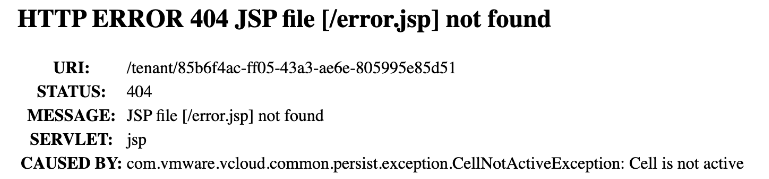
When logging into VMware Cloud Director and presented with a 404 caused by Cell is not active, there is a pretty good chance the database is not in a healthy state.
As explained in this VMware document the database cluster health can be determined by logging in as root to the appliance management UI at https://primary_eth1_ip_address:5480. The database state this time was READ ONLY PRIMARY.
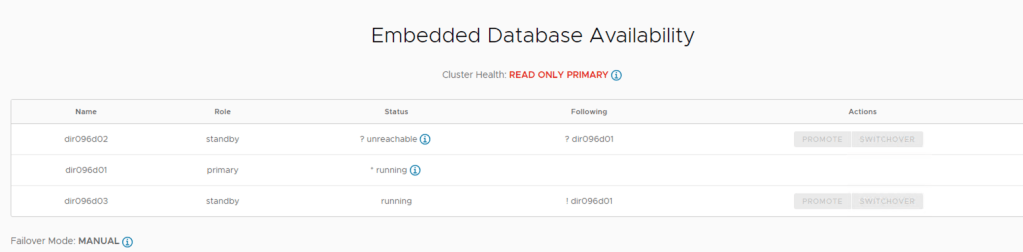
According to the same VMware document the reason for a status of Read_Only_Primary is there is an online primary database, but it is Read_Only because the environment does not have an operational standby cell. Two new standby cells must be deployed. The VMware Cloud Director UI and API are not available.

The associated VMware document to follow in order to resolve this is Recover from a VMware Cloud Director Appliance Standby Cell Failure in a High Availability Cluster. The document only outlines the process to recover by deploying a new standby cell. The reason for this blog post is to outline the steps to recover using the existing standby cells.
1. Validate the Cluster health
– SSH into the primary cell and execute these commands:
su - postgresrepmgr cluster show– If degraded we need to clone the affected secondary nodes.
2. Backup all cells
– Power off all VCD cells and take a snapshot.
3. Power on Database cells and gather needed details
– Power on the there database cells.
– Stop the vmware-vcd service on all three database cells.
systemctl stop vmware-vcd.service– Get the IP of the primary cell. Once you have the IP Address close the SSH session to the primary cell to avoid confusion.
4. Recover the standby cells
– Run these commands on the STANDBY CELLS ONLY
– SSH to the first standby cell.
– stop vpostgres service
systemctl stop vpostgres– Remove the current pgdate from the Secondary
rm -rf /var/vmware/vpostgres/current/pgdata– Clone the DB using the Primary IP address (example 192.168.200.1) as follows:
su - postgres -c "/opt/vmware/vpostgres/current/bin/repmgr -d 'host=192.168.200.1 user=repmgr gssencmode=disable' standby clone"– Start the postgres service
systemctl start vpostgres– Register the cell to the Cluster. Use the IP from the Primary on the following command.
su - postgres -c "/opt/vmware/vpostgres/current/bin/repmgr -h 192.168.200.1 -U repmgr -d remgr -f /opt/vmware/vpostgres/current/etc/repmgr.conf standby register --force"– Run the same commands on the second standby cell.
– Database Cluster state should now be healthy.
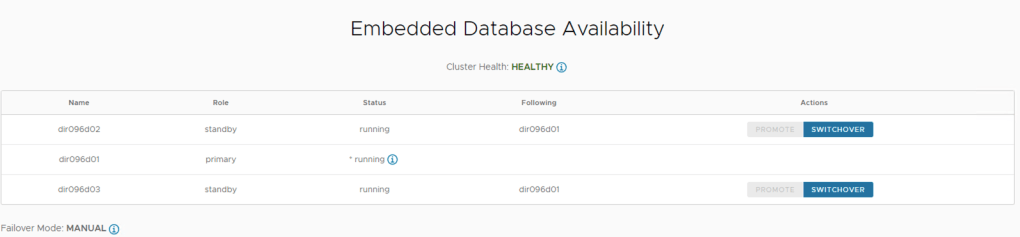
– SSH to the database cells and start the vmware-vcd service.
systemctl start vmware-vcd.service6. Power on remaining application cells.
The VMware Cloud Director UI and API are now available once again.
 Blag Scamall
Leave a comment