I had the daunting task of migrating from one key provider to another and I was pleasantly surprised how well it went so I wanted to share the steps I followed.
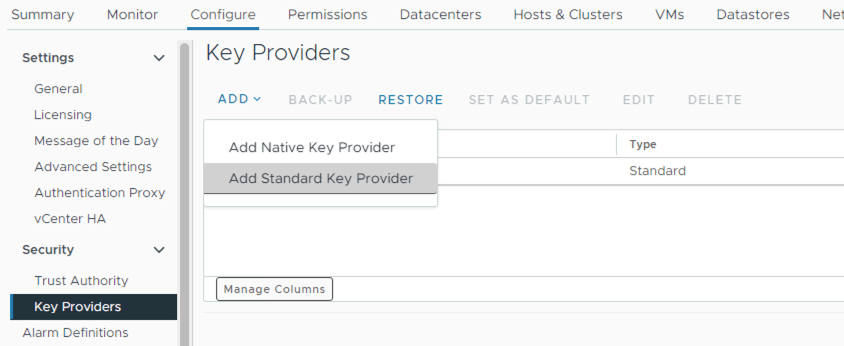
- Once you have the new key provider, connect it to vCenter as a new key provider:
vCenter -> Configure -> Security -> Key Providers -> Add New Standard Key Provider
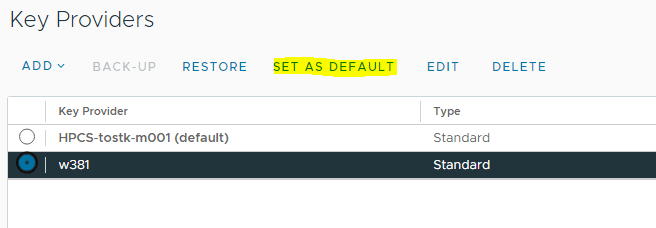
- Set the new key provider as the default for new objects
- Install PowerCLI if needed
- The Modules needed are VMEncryption and VsanEncryption PowerCLI modules. Download the
psm1file for each and runImport-Moduleto import them. - Open PowerCLI and connect to vCenter –
Connect-VIServer - We will use the following PowerCLI commands to rekey, host keys, and virtual machine keys
Host Keys
- In almost all cases hosts in the same cluster are protected by the same provider and key, but this process ensures they are protected by the new key provider
- It is assumed here that all hosts are already in clusters enabled for encryption. If not, this command will initialise hosts and clusters for encryption.
foreach($myhost in Get-VMHost) {
  echo $myhost.name
Set-VMHostCryptoKey -VMHost $myhost -KMSClusterId new-key-provider}- Display host key providers to verify result
Get-VMHost| Select Name,KMSserver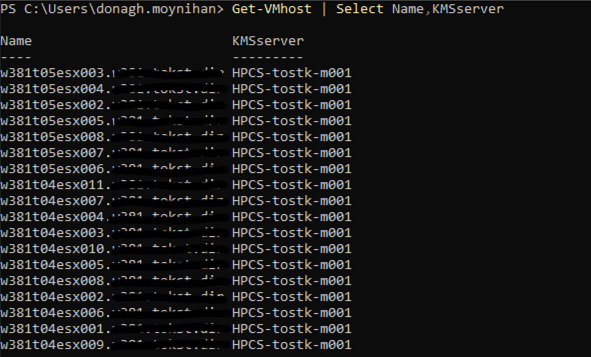
Virtual Machine Keys
- Rekey all encrypted virtual machines
- Each rekey operation starts a task which typically takes a couple minutes to complete for each encrypted VM
foreach($myvm in Get-VM) {  if($myvm.KMSserver){
    echo $myvm.name
    Set-VMEncryptionKey -VM $myvm -KMSClusterId new-key-provider
  }
}- Display all virtual machines key providers to verify result. Some may be unencrypted.
Get-VM| Select Name,KMSserver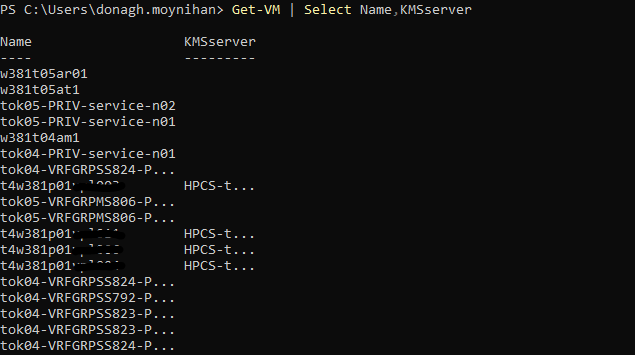
 Blag Scamall
Leave a comment